How to Print Blueprints at Home on A4 Paper
How to Print Blueprints at Home on A4 Paper
Short answer: You can print blueprints at home by tiling the drawing across multiple A4 (or Letter) sheets with a PDF reader’s Poster option or a free tiling tool like Posteriza, then trimming and taping the sheets into one large plan. Blueprints are ideal for this — vector lines and black-and-white drawings stay razor sharp at any scale and use minimal ink.
Whether you’re an architecture student pinning up a studio review, a contractor marking up a site plan, or a DIYer building from downloaded plans, home-tiled blueprints cost pennies per sheet. This guide covers why blueprints tile so well, three free methods, paper tips, and — honestly — when you should just go to a print shop instead.
Why Blueprints Are Perfect for Tiled Printing
- Vector lines stay sharp. Most blueprints and CAD exports are vector PDFs — lines remain crisp no matter how much you enlarge them, unlike photos that pixelate.
- Black and white = cheap. Line drawings use a fraction of the ink of a color poster. A full set of tiled plan sheets costs less in ink than one photo print.
- Precision matters more than beauty. Seams between tiles are easy to align on a technical drawing: just match the grid lines and dimension ticks.
- Markup-friendly. Tiled prints on plain paper are made for red pens, highlighters, and coffee rings — exactly what a working drawing is for.
Method 1: PDF Reader Poster Mode (Fastest)
If your blueprint is already a PDF, the free Adobe Acrobat Reader can tile it with zero new software:
- Open the PDF in Acrobat Reader → File → Print.
- Click Poster under Page Sizing & Handling.
- Set Tile Scale so the finished size matches your plan’s intended scale (e.g., a drawing meant for 24×36 in from a Letter PDF needs ~300%).
- Set Overlap to 0.25 in, turn on Cut Marks and Labels.
- Print, trim, and tape the tiles in label order.
Full walkthrough: how to print a poster in Adobe Acrobat Reader.
Method 2: Posteriza (Most Control)
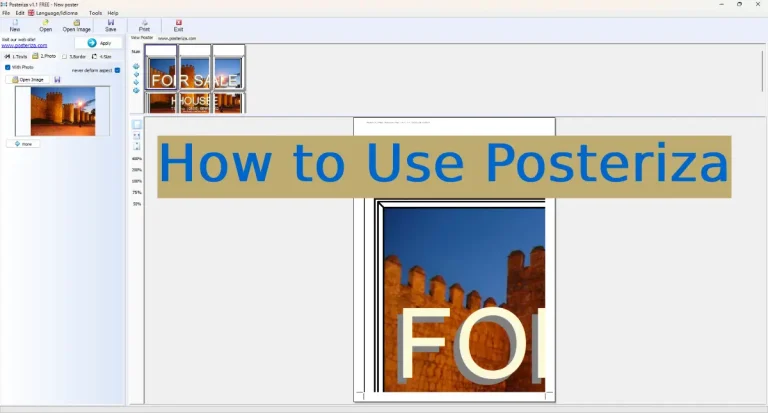
Posteriza is a free, open-source tiling app that lets you set the exact final dimensions in inches or centimeters — important when a drawing must stay to scale. It also tiles image formats (PNG, JPG, TIFF) directly, which Reader can’t do.
Method 3: Online Tiling Tool (No Install)
Our free online tool splits blueprint PDFs and images into A4 tiles right in your browser. Best for one-off prints on a computer where you can’t install software.
| Method | Best for | Cost | Scale control |
|---|---|---|---|
| Acrobat Reader Poster | Quick PDF tiling, nothing to install | Free | Percentage only |
| Posteriza | Exact-scale plans, image formats | Free | Exact dimensions |
| Online tool | One-off prints, locked-down computers | Free | Good |
Paper and Printer Tips
- Plain copy paper is fine. Unlike photo posters, blueprints don’t need fancy stock — standard 80 gsm A4 works and keeps costs minimal. For pin-up presentations, step up to 120–160 gsm so sheets don’t curl on the wall.
- Draft mode is your friend for working copies and markups; switch to best quality only for final presentations.
- Check scale with a ruler. After printing, measure a known dimension (a dimension line or the drawing’s scale bar). If it’s off, adjust the tile scale percentage and reprint one test tile before running the full set.
- Need heavier stock for presentation boards? See our paper recommendations for large prints. If your home printer can’t handle the volume, a dedicated home printer upgrade pays for itself quickly at blueprint quantities.
When to Go to a Print Shop Instead
Home tiling covers most needs, but be honest about its limits:
- True blueprint machines (wide-format plotters) print a 36-inch-wide plan in one seamless sheet — no assembly, no seam alignment risk. For permit submissions or client deliverables, this is the professional standard.
- Volume. Tiling a 20-sheet plan set at home is a weekend project; a shop plots it in minutes.
- Cost crossover. Many copy shops charge only a few dollars per D-size sheet. If your time is worth more than the assembly hour, outsource it.
Curious what a full-size engineering print service costs and how it works? Read our guide to engineering prints — that’s the print-shop route, while this page is the do-it-at-home route.
Frequently Asked Questions
Will my blueprint stay to scale when tiled?
Yes, if you set it up right. Use a tool that accepts exact output dimensions (like Posteriza) rather than a percentage, then verify with a ruler against a known dimension or scale bar on the first printed tile.
What paper size should I use for blueprints at home?
Whatever your printer takes — A4 or US Letter both work. The tiling software handles the math; more sheets just means a bigger final plan. A3 printers halve the sheet count if you have access to one.
Can I print blueprints in color at home?
Yes — modern “blueprints” are usually black lines on white anyway, but if your CAD export has color layers (red electrical, blue plumbing), any color inkjet handles them. It just costs more in ink.
How do I keep long plan sheets aligned when taping?
Print with 5–6 mm overlap and cut marks, trim one edge of each tile precisely, then align using the drawing’s own grid lines as guides — they’re straighter than any ruler work you’ll do by eye.
Is it cheaper to print blueprints at home or at Staples?
At home: pennies per A4 sheet plus your time assembling. At a shop: a few dollars per seamless large sheet, zero assembly. For 1–2 working copies, home wins; for presentation sets or permit drawings, the shop wins.
Can I tile a DWG file directly?
Not directly — tiling tools work with PDF or image exports. Export (or “plot to PDF”) from AutoCAD or your CAD app first, then tile the PDF. Keep the export at high resolution or as vector PDF for the sharpest lines.
Disclosure: This page contains affiliate links. If you buy through them, we may earn a commission at no extra cost to you.